Scalix Insights4 min read
Streamlining Garage Operations: A UX-Driven Management System That Reduced Service Time
By Prafful Suthar
Streamlining Garage Operations: A UX-Driven Management System That Reduced Service Time
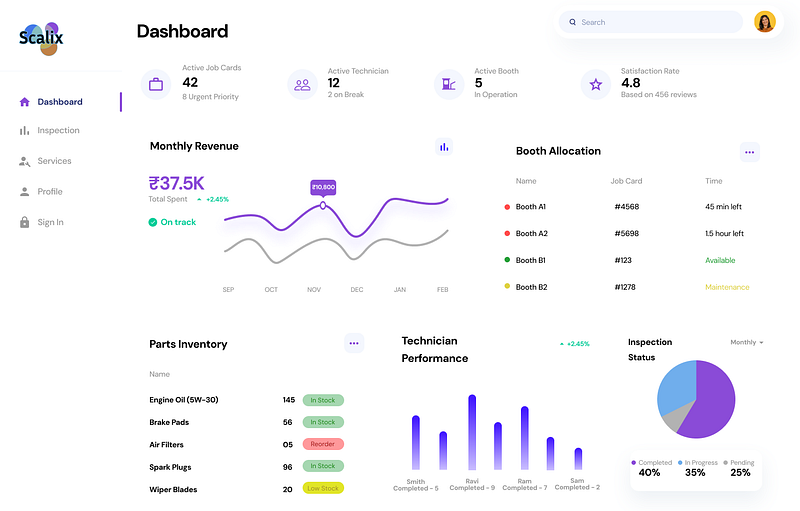
A UX driven web application designed from scratch to digitize and streamline end-to-end garage operations aligning floor managers, technicians, and staff around a single, structured workflow.
Problem Statement
The system was designed for an automotive service garage handling multiple vehicles daily with limited digital infrastructure. Operations relied on paper job cards, verbal coordination, and manual tracking, causing frequent information loss, delayed service approvals, repeated inspections, and billing errors. As service volume increased, floor managers struggled to track job status, technicians lacked clear task priorities, and customers experienced longer turnaround times. This operational friction directly impacted service efficiency, accountability, and the garage’s ability to scale without adding overhead.
User Story
Persona
Floor Manager at an automotive service center manages a busy garage with 8 technicians and handles 20–25 vehicles daily.
Frustration
-
Spends 30% of his day answering “What’s the status of my car?” calls
-
Loses track of which technician is working on which vehicle
-
Struggles to provide accurate quotations without rechecking inventory multiple times
-
Cannot easily prove work completed when customers dispute charges
Desired Outcome
As a floor manager, I want a centralized dashboard that shows me every vehicle’s real-time status so that I can give customers accurate updates without interrupting technicians.
Solution
Design Approach
The design followed a workflow-first UX strategy combined with progressive disclosure. Before designing UI, the entire garage process was mapped visually (as shown in the user flow diagram) to identify dependencies, decision points and failure risks. Screens were then designed to surface only task relevant information at each stage helping users focus without losing context.
Implementation
-
Role aware screens for floor managers and technicians
-
Step based job card progression instead of free navigation
-
Visual status indicators for inspection, approval, service and billing stages
-
Embedded photo capture to support inspections and post service proof
User Flow
The workflow was intentionally designed to reflect how garages actually operate on the floor not an idealized process.
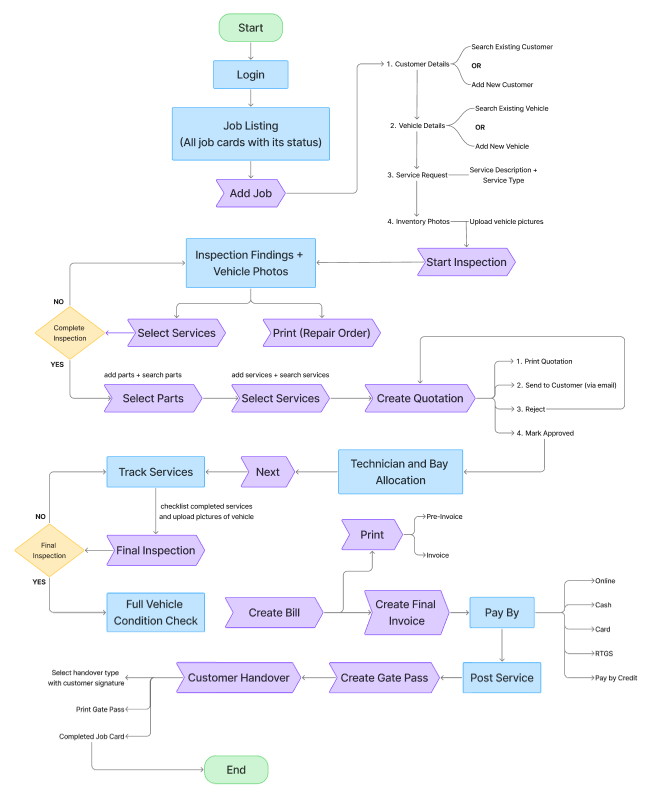
Each step answers one question: “What does the user need to do right now?” reducing cognitive load in a fast paced and interruption heavy environment.
Visual Design Decision
Color Palette:
A neutral, industrial base color palette reinforces trust and professionalism, while a single accent color highlights critical actions guiding attention without visual noise.
-
Primary: Sand Gold (#D4A56C) — trust and craftsmanship
-
Secondary: Deep Maroon (#571718) — control and authority
-
Tertiary: Burnt Copper (#AE6D39) — energy and motion
-
Neutrals: Soft grays with high contrast ratios (WCAG AA compliant)
Typography:
A strong typographic hierarchy separates operational data from decision making actions, making dense service information easy to scan even in high pressure environments.
-
Headers: Outfit (24–32px)
-
Body Text: Outfit (20px)
-
Data Tables: Outfit (16px)
With multiple weights, Outfit enables clear distinction between headings, labels, status and actions reducing cognitive load for users who constantly switch tasks.
Tools and Technology
-
Figma: Primary design tool for low-fidelity designs (wireframes) and high-fidelity designs (prototyping)
-
Figjam, Miro: Collaborative user journey mapping and user flows
-
Adobe XD: Custom iconography
-
AI Tools: Lovable, Visily, Claude, ChatGPT
Results
Quantified Outcomes
-
Centralized Job Card Lifecycle: One digital record from vehicle entry to handover
-
Inspection-Led Workflow: Services and parts unlocked only after inspection completion
-
Approval-Controlled Quotation: Prevents unauthorized service execution
-
Real-Time Service Tracking: Clear visibility into job progress and accountability
-
Flexible Billing & Payments: Supports real-world garage payment scenarios
-
Post-Service Documentation: Builds trust through before/after vehicle images
Responsive Design Consideration
-
Desktop Interface: multi-column layouts leveraging wide screens
-
Tablet Interface: portrait and landscape orientation support
Before/After Comparison
Before(paper based system)
-
Manual job cards prone to loss and duplication
-
No centralized view of job or service status
-
Repeated inspections due to missing context
-
High dependency on verbal updates
-
Limited scalability as service volume increased
After (digital garage management system)
-
End-to-end digital workflow with clear ownership
-
Improved service traceability and accountability
-
Faster approvals and reduced service delays
-
Better coordination between managers and technicians
-
Foundation for scaling operations without process breakdown
Conclusion
This project demonstrates how UX thinking can bring structure to complex, operational environments without disrupting real-world behavior. By designing around actual garage workflows not assumptions, the system reduces friction, improves clarity, and supports scalability.
The result is a tool that doesn’t just digitize tasks, but actively guides decisions, enforces process discipline and enables garage teams to work faster, smarter and with confidence.
📞 Let’s Build Smarter WorkflowsComplex operations don’t need complex interfaces. With the right UX strategy, everyday tools can become performance enablers.
**Tags:
**#ProductDesign #UXForOperations #B2BDesign #SystemDesign #UXProcess
About the author
Prafful Suthar writes for Scalix on enterprise platforms, high-throughput systems, and ERP delivery. Scalix builds and migrates mission-critical software for regulated and scale-heavy organizations from Mumbai and remote-first teams. See our case studies for problem–solution–result write-ups, or contact us about your roadmap.